

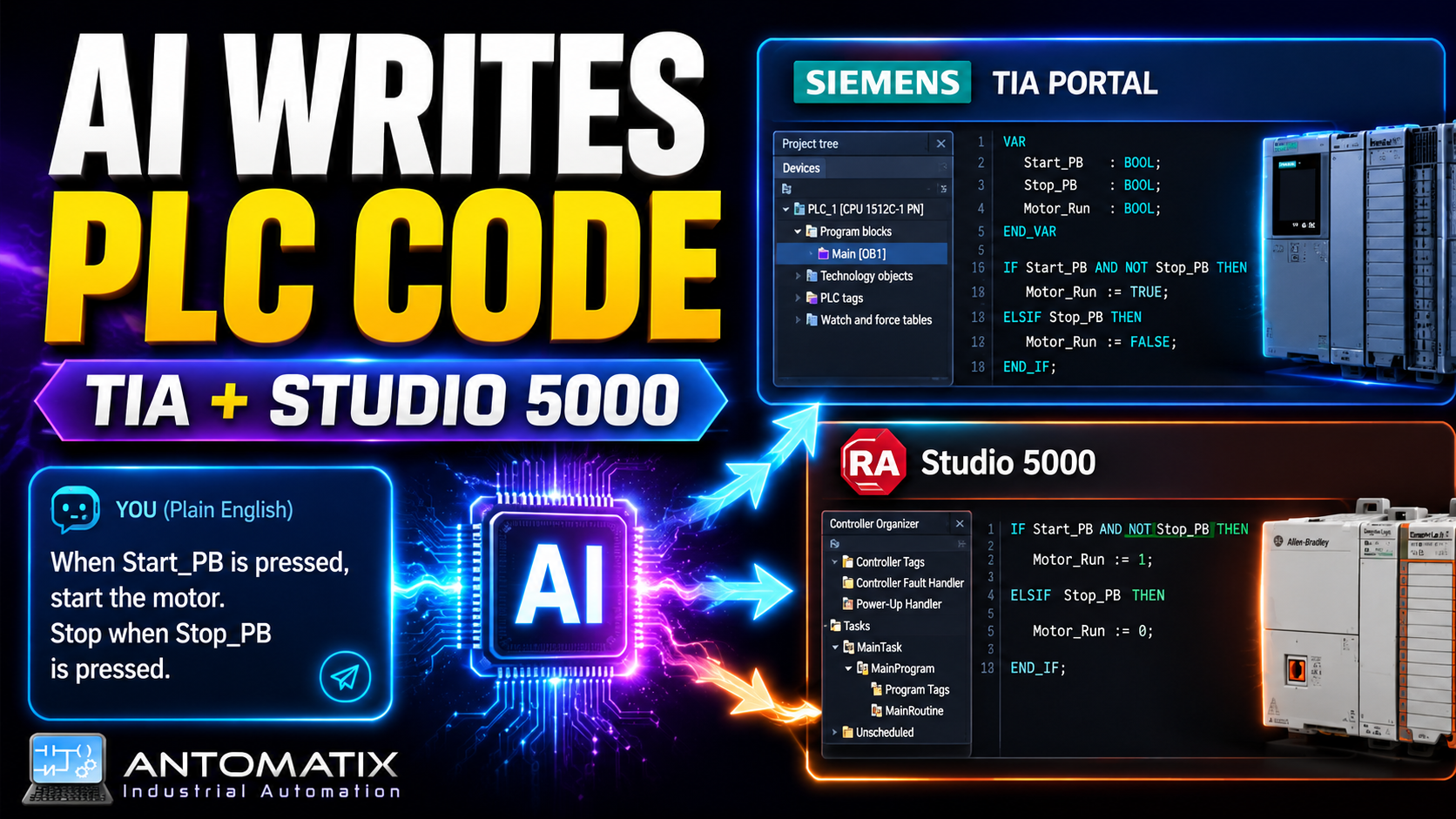
Industrial automation is changing quickly. PLC engineers are already using better simulation tools, remote access, digital commissioning workflows and software libraries to reduce repetitive work. The next step is obvious: using AI to help generate PLC logic faster, while still keeping the engineer in control.
That is why I built Antomatix PLC Forge.
Download it here: AI Generator
Antomatix PLC Forge is an AI-powered PLC logic generation tool designed to help create structured PLC code for two of the most common industrial automation platforms:
- Siemens TIA Portal
- Allen-Bradley Studio 5000 Logix Designer
The aim is simple: describe the control logic in plain English, generate PLC code, review it, validate it, and then create or import the logic into the engineering project.
For Siemens projects, Antomatix PLC Forge can generate SCL and create a Function Block in TIA Portal using TIA Openness.
For Allen-Bradley projects, Antomatix PLC Forge can generate Structured Text and import it into Studio 5000 as an Add-On Instruction using the Logix Designer SDK.
This is not intended to replace a controls engineer. It is designed to speed up repetitive PLC development tasks, improve consistency, and give engineers a better starting point when creating common machine control logic.
Why I Built Antomatix PLC Forge
A lot of PLC programming work is repetitive.
If you work in industrial automation, you know the pattern. You often need to create similar logic for conveyors, lifts, pushers, transfers, diverters, motors, valves, alarms, interlocks and mode handling.
The exact project may be different, but the structure is often similar:
- enable conditions
- automatic/manual mode
- safety permissives
- drive healthy checks
- start and stop commands
- jam detection
- movement timeout
- fault reset
- alarm outputs
- state machines
- motor outputs
- feedback checks
- request handling
Writing this logic manually every time takes time. Copying from old projects is faster, but it can also bring old mistakes, wrong tags, old naming conventions, and logic that does not quite match the new machine.
AI can help, but raw AI output is not enough.
If you simply ask an AI model to “write PLC code”, it may produce something close, but not always something that compiles, follows platform syntax, or fits the structure of a real industrial project.
That is the gap Antomatix PLC Forge tries to solve.
The goal is not just to generate text. The goal is to create a workflow where the engineer can:
- describe the logic,
- generate Siemens or Rockwell code,
- preview and edit the result,
- validate basic safety rules,
- export or import the code into the PLC engineering environment,
- keep full control before anything is used on a real machine.
What Antomatix PLC Forge Does
Antomatix PLC Forge is a desktop application for AI-assisted PLC logic generation.
The app allows the user to select a target platform, choose an AI provider, enter a project path, write a logic request, generate code, review the generated code, and create or import the result into the engineering software.
The current focus is on two platforms:
Siemens TIA Portal
In Siemens mode, the app generates Siemens SCL and creates a Function Block inside a TIA Portal project.
The Siemens workflow is based around:
- TIA Portal project selection
- target PLC selection
- SCL generation
- local code validation
- TIA Openness worker
- external SCL source creation
- Function Block generation
- PLC software compile
- project save option
- detailed worker logs
This means the app can create a real Siemens Function Block rather than only producing code in a text window.
Allen-Bradley Studio 5000
In Allen-Bradley mode, the app generates Rockwell Structured Text and packages it as an Add-On Instruction.
The Rockwell workflow is based around:
- Studio 5000 project selection
- Structured Text generation
- AOI generation
- L5X export
- Logix Designer SDK import
- collision handling
- optional overwrite
- project save option
- detailed SDK worker logs
The reason for using Add-On Instructions is important. A normal Rockwell Structured Text routine depends heavily on external program or controller tags. That can create problems when generated logic references tags that do not exist yet.
An AOI is a better match because it contains its own parameters and local tags. This makes it closer to a Siemens Function Block and more suitable for reusable machine logic.
Siemens TIA Portal Code Generation
Siemens TIA Portal is one of the most widely used PLC engineering environments in the world. Many automation engineers use SCL for structured and reusable control logic, especially when building Function Blocks.
Antomatix PLC Forge uses AI to generate Siemens SCL based on a plain-English request.
For example, the user can describe a lift control block like this:
“Create a Siemens SCL Function Block for a three-level lift. Inputs include enable, auto mode, safety OK, drive healthy, emergency stop OK, requests for levels 1, 2 and 3, level sensors, upper and lower limits, door closed and load present. Outputs include motor up, motor down, brake release, ready, moving, at target, fault and alarms. Stop and fault conditions must always win. Motor up and motor down must never be true at the same time.”
The app then generates SCL code with a proper block structure, such as:
- FUNCTION_BLOCK declaration
- VAR_INPUT section
- VAR_OUTPUT section
- VAR section
- state machine logic
- permissive logic
- movement logic
- fault handling
- alarm handling
- timer logic
- output protection
The generated code can then be reviewed and edited inside the app before being written into TIA Portal.
The important part is that the engineer remains in control. AI generates a first version, but the engineer reviews, validates and compiles the logic.
TIA Openness Integration
One of the most powerful parts of Antomatix PLC Forge is the Siemens integration through TIA Openness.
TIA Openness allows external applications to automate certain engineering tasks in TIA Portal. In this app, it is used to open a TIA Portal project, find the selected PLC, add the generated SCL as an external source, generate a Function Block, compile the PLC software and optionally save the project.
The basic Siemens workflow looks like this:
- Select Siemens TIA Portal mode.
- Browse to a TIA Portal project file.
- Enter the target PLC name.
- Enter the Function Block name.
- Write the logic request.
- Generate SCL using the selected AI provider.
- Review the generated SCL.
- Validate the code.
- Create the Function Block using TIA Openness.
- Compile the PLC software.
- Review the result in TIA Portal.
This is much more useful than only generating code in a browser because the result becomes part of the engineering project.
The app also uses a separate worker process for the TIA Openness part. This keeps the main application cleaner and makes it easier to handle TIA-specific requirements, logging and errors.
Allen-Bradley Studio 5000 Code Generation
Antomatix PLC Forge also supports Rockwell Automation / Allen-Bradley workflows.
In Allen-Bradley mode, the app generates Rockwell Structured Text suitable for Studio 5000 Logix Designer.
The first approach was to generate a normal Structured Text routine. That works for some use cases, but it has a limitation: a routine does not carry its own input and output interface in the same way a Siemens Function Block does.
For reusable logic, an Add-On Instruction is a better approach.
That is why Rockwell mode now focuses on AOI generation.
A typical Rockwell request may be:
“Create a Rockwell Add-On Instruction for lift control with inputs Enable, AutoMode, SafetyOk, DriveHealthy, EmergencyStopOk, ResetFault, RequestLevel1, RequestLevel2, RequestLevel3, AtLevel1, AtLevel2, AtLevel3, UpperLimit, LowerLimit, DoorClosed and LoadPresent. Outputs should include MotorUp, MotorDown, BrakeRelease, Ready, Moving, AtTarget, Fault and alarms. MotorUp and MotorDown must never be true at the same time. Stop and fault conditions must always win.”
The app then generates Rockwell-style Structured Text and packages it into an L5X Add-On Instruction import file.
The AOI can include:
- input parameters
- output parameters
- local tags
- timer tags
- internal state values
- Structured Text logic
- comments
- reusable machine control structure
This makes the output much more useful than a loose text routine.
Logix Designer SDK Integration
The Rockwell side uses the Logix Designer SDK to interact with Studio 5000 project files.
The app can create an L5X Add-On Instruction file and then use the SDK worker to import it into a Logix project.
The workflow looks like this:
- Select Allen-Bradley / Rockwell Logix 5000 mode.
- Browse to a Studio 5000 project file.
- Enter the target program or AOI name.
- Write the logic request.
- Generate Rockwell Structured Text.
- Review the generated code.
- Generate the AOI L5X file.
- Import the AOI using the Logix Designer SDK.
- Review the imported AOI in Studio 5000.
- Call the AOI from the required program routine and map real project tags.
The app also supports L5X export as a fallback. This is important because SDK environments can be sensitive to installed dependencies, project versions and local Studio 5000 configuration.
If direct SDK import is not available, the generated L5X file can still be imported manually in Studio 5000.
AI Providers Supported
Antomatix PLC Forge is designed so users can configure their own AI provider.
This is important for a public tool because the app should not include a private API key. Each user should use their own key or their own local AI model.
The app is designed around provider flexibility, including options such as:
- OpenAI
- Google Gemini
- OpenRouter
- Groq
- Ollama
- custom OpenAI-compatible endpoints
This makes the tool more flexible for different users.
Some users may want the best possible model quality. Others may want a lower-cost or free-tier model for testing. Some companies may prefer local AI models using Ollama so that prompts and project descriptions stay on their own machine.
The key point is that the AI provider is configurable. The PLC engineering workflow remains the same.
Code Preview and Validation
AI-generated PLC logic should never be blindly trusted.
For that reason, Antomatix PLC Forge includes a code preview and validation step.
Before code is written into TIA Portal or imported into Studio 5000, the engineer can review the generated code.
The app also performs local safety checks to block obvious unwanted patterns. Examples include dangerous or unsuitable instructions, unsupported syntax, absolute addressing patterns and source structures that do not match the selected platform.
The validation system is not a replacement for engineering review. It is a first guardrail.
A real engineer must still:
- read the generated code,
- check the logic,
- compile the project,
- simulate where possible,
- test in a safe environment,
- follow company standards,
- follow machine safety requirements,
- never download unverified AI-generated logic to a live machine.
This is an important part of the philosophy behind the app.
AI should assist engineers. It should not bypass engineering responsibility.
Why AI Code Generation Makes Sense for PLC Engineers
PLC development contains many repeated patterns.
For example, a motor control block may require:
- enable logic,
- start/stop latch,
- overload fault,
- drive healthy feedback,
- safety stop,
- reset logic,
- alarm bits,
- timer for feedback fault,
- manual/auto mode handling.
A conveyor zone may require:
- product sensor logic,
- accumulation state,
- downstream ready,
- jam timer,
- motor command,
- release command,
- fault reset.
A lift may require:
- level requests,
- position sensors,
- up/down interlock,
- brake release,
- door closed checks,
- upper/lower limit faults,
- travel timeout,
- state machine.
These are exactly the types of patterns where AI can help produce a useful starting point.
The engineer still decides what is correct, but AI can reduce the time spent creating the first draft.
Instead of starting with a blank editor, the engineer starts with generated logic that can be reviewed, edited and improved.
Practical Use Cases
Antomatix PLC Forge can be useful for many industrial automation tasks.
1. Fast Prototyping
When designing a new machine sequence, the engineer can quickly generate a first version of the logic and then refine it.
This is especially useful during early development when the exact machine behaviour is still being discussed.
2. Repetitive Machine Logic
Common equipment such as conveyors, lifts, pushers, diverters, turntables and transfer units often share similar control structures.
AI generation can reduce repetitive coding time.
3. Training and Learning
The app can help junior engineers understand how structured PLC logic is built.
For example, they can ask for a lift control block and then study the generated state machine, permissive logic and fault handling.
4. Commissioning Preparation
Before going to site, engineers can generate draft blocks, test concepts and prepare logic structures.
This can help reduce time pressure during commissioning.
5. Standardisation
With carefully written prompts and templates, the app can encourage more consistent naming, comments and structure.
This can help teams move toward reusable logic standards.
6. Cross-Platform Thinking
Because the app supports Siemens and Allen-Bradley workflows, it can help engineers think about equivalent structures between platforms.
For example:
- Siemens Function Block ≈ Rockwell Add-On Instruction
- Siemens SCL ≈ Rockwell Structured Text
- TIA Openness ≈ Logix Designer SDK / L5X import workflow
They are not identical, but the app helps bridge the thinking between the two ecosystems.
Siemens Function Block vs Rockwell AOI
One of the most useful design decisions in Antomatix PLC Forge is treating Siemens Function Blocks and Rockwell Add-On Instructions as equivalent targets.
They are not exactly the same, but they solve a similar problem: reusable logic with a defined interface.
Siemens Function Block
A Siemens Function Block usually contains:
- inputs,
- outputs,
- static memory,
- temporary variables,
- SCL/LAD/FBD logic,
- instance data.
It is a natural target for generated reusable logic.
Rockwell Add-On Instruction
A Rockwell AOI can contain:
- input parameters,
- output parameters,
- in/out parameters,
- local tags,
- logic routine,
- reusable instruction definition.
This is a better match than a normal routine when generating reusable machine logic.
That is why Antomatix PLC Forge focuses on:
- Siemens SCL Function Blocks for TIA Portal,
- Rockwell Structured Text AOIs for Studio 5000.
This creates a more professional and reusable output.
Example: Three-Level Lift Control
A good example is a three-level lift.
The engineer can describe:
- three floor requests,
- three position sensors,
- up and down motor outputs,
- brake release,
- safety OK,
- emergency stop OK,
- door closed,
- upper and lower limits,
- drive healthy,
- fault reset,
- travel timeout,
- alarm outputs.
The AI can then generate a structured state machine.
Typical states could include:
- Idle
- Select Target
- Move Up
- Move Down
- Arrived
- Faulted
The generated code can include rules such as:
- stop conditions always win,
- MotorUp and MotorDown can never be active at the same time,
- movement is only allowed when all permissives are healthy,
- the lift stops when the target sensor is reached,
- movement timeout creates a fault,
- door opening during movement creates a fault,
- drive fault stops the lift,
- reset clears alarms only when conditions are healthy.
This kind of example is perfect for showing how AI can help create a useful first version of industrial control logic.
Important Safety Note
AI-generated PLC code must always be treated as draft code.
It should never be downloaded directly to a live PLC without review.
Before using any generated logic, an engineer must:
- inspect the code,
- check platform syntax,
- compile the project,
- simulate the logic where possible,
- test on a safe test system,
- verify all safety requirements,
- check machine risk assessments,
- follow site standards,
- follow company engineering rules,
- follow applicable regulations and safety standards.
AI can speed up development, but it does not understand the full physical machine, the risk assessment, the wiring, the real devices, the commissioning environment or the consequences of unsafe motion.
The engineer remains responsible.
Antomatix PLC Forge is an engineering assistant, not an automatic machine safety approval tool.
Why This Matters for the Future of Automation
Industrial automation software is moving toward more intelligent workflows.
Engineers already use libraries, templates, simulation, version control, remote access and automated testing. AI code generation is another tool in that direction.
The real value is not just “AI writes code”.
The real value is a better workflow:
- describe the intent,
- generate a structured first draft,
- validate obvious issues,
- integrate with engineering software,
- compile,
- test,
- improve,
- reuse.
For PLC engineers, this could reduce repetitive work and free up more time for the hard parts of automation:
- understanding the machine,
- debugging real behaviour,
- improving reliability,
- reducing downtime,
- improving commissioning quality,
- building better standards.
AI will not remove the need for good controls engineers. In fact, it may make good engineers more valuable, because they will be the ones who understand how to guide, review and safely apply these tools.
Current Status
Antomatix PLC Forge is currently being developed and tested as an experimental engineering tool.
Current core features include:
- AI-powered PLC code generation
- Siemens SCL generation
- Siemens TIA Openness Function Block creation
- Rockwell Structured Text generation
- Rockwell AOI L5X generation
- Logix Designer SDK import workflow
- manual L5X export fallback
- multiple AI provider support
- local API key configuration
- code preview
- validation checks
- worker logs
- save/load project settings
- public-release packaging work
Future improvements may include:
- more machine templates,
- conveyor logic templates,
- lift logic templates,
- pusher and diverter templates,
- test generation,
- simulation integration,
- PLCSIM Advanced workflows,
- more validation rules,
- documentation generation,
- GitHub release,
- community examples.
Final Thoughts
Antomatix PLC Forge is an experiment in what AI-assisted industrial automation development could look like.
The idea is not to replace PLC engineers.
The idea is to help engineers move faster.
Instead of spending time repeatedly writing the same boilerplate logic, engineers can describe the required behaviour, generate a draft, review it, and import it into the correct engineering platform.
For Siemens users, that means SCL Function Blocks created through TIA Openness.
For Allen-Bradley users, that means Structured Text Add-On Instructions created through the Logix Designer SDK and L5X workflows.
The future of PLC programming will still require engineering judgement, machine knowledge and safe commissioning practices.
But the tools are changing.
And Antomatix PLC Forge is one step toward faster, smarter and more flexible PLC development.
Disclaimer
Antomatix PLC Forge is an independent engineering tool and is not affiliated with, endorsed by, or sponsored by Siemens, Rockwell Automation, Allen-Bradley, OpenAI, Google, Groq, OpenRouter or Ollama.
All generated PLC code must be reviewed, tested and validated by qualified personnel before use in any real industrial system.